
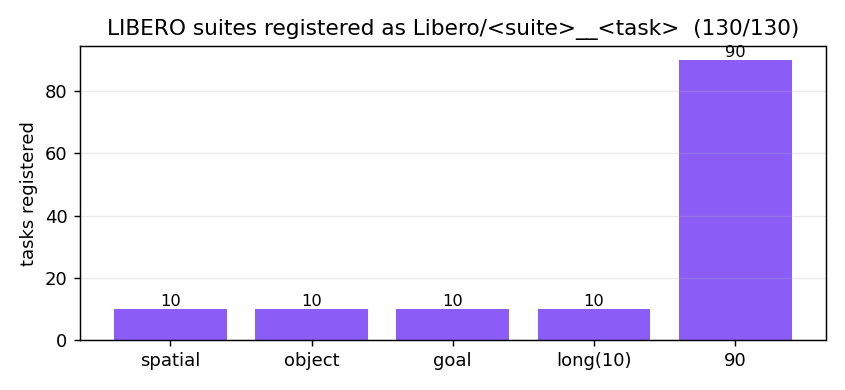
LIBERO + LIBERO-plus → RoboVerse 1:1 integration#
LIBERO (Lifelong Robot
Learning, Liu et al. 2023) is a 130-task manipulation benchmark of robosuite /
MuJoCo environments across five suites (libero_spatial, libero_object,
libero_goal, libero_10, libero_90).
LIBERO-plus (In-depth Robustness
Analysis of VLA Models, 2025) is a drop-in superset that expands every suite
with thousands of perturbation variants — 10,120 tasks across seven
dimensions (object layout, camera viewpoint, robot init state, language rewrite,
lighting, background texture, sensor noise).
RoboVerse integrates both as passthrough task packs: registration is lazy
and import-safe, and the env is the native LIBERO(-plus) OffScreenRenderEnv,
so observations / dynamics / 128×128 camera bytes are bitwise-identical to
upstream. On top of that we verify a pure-MetaSim native reproduction (load
the scene into MetaSim’s own MuJoCo handler) and a bitwise OSC_POSE controller
port so LIBERO EE-delta policies can run inside MetaSim.
Beyond passthrough (which still imports the upstream library), the
roboverse_pack.tasks.libero.native_libero pack runs all 130 base LIBERO tasks
with zero libero / robosuite import at runtime — each task loads its own
compiled scene MJCF onto MetaSim’s MuJoCo handler, with a robosuite-free OSC
controller and a native BDDL success checker. Mesh assets are resolved from the
deduplicated tree on HuggingFace RoboVerseOrg/roboverse_data, so a machine with the
upstream packages uninstalled still loads and runs them; the checker is verified
bitwise (0 mismatch vs env._check_success) on all 130
(see Native MetaSim tasks).
Status#
Capability |
Result |
Where |
|---|---|---|
LIBERO passthrough |
130 / 130 tasks, obs+step bitwise (Δ=0) |
|
LIBERO-plus passthrough |
10,120 / 10,120 tasks, state/reward/done bitwise (Δ=0) |
|
demo-replay parity |
passthrough == native, Δ=0 (380 demos) |
|
asset audit |
7/7 perturbation dims genuinely applied, 0 silent fallback |
|
MetaSim MuJoCo migration |
6/6 dims: state-set Δ=0, engine Δ=0 |
|
OSC_POSE port |
bitwise — per-state joint-torque Δ = 5.55e-15 N·m |
|
BC policy (closed-loop) |
clean 100 % / light 0 % / camera 50 % / noise 75 %; passthrough==native Δ=0 |
|
Native tasks (no libero/robosuite) |
130 / 130 base tasks: ported BDDL checker bitwise (0 mismatch vs |
|
Vendored assets (library-deletable) |
deduped meshes (~265 MB, shared Franka/arena) on HF; native task loads with |
|
MetaSim core changes: 0 (the passthrough reuses the unmodified upstream env; the MetaSim handler loads the scene MJCF verbatim).
Environment setup#
LIBERO pins numpy<1.24 / robosuite==1.4.0 / bddl==1.0.1 / mujoco==3.2.3,
which conflict with the default RoboVerse env — so install each in a dedicated
conda env. The passthrough is a safe no-op in any env where LIBERO is not
importable (registration registers nothing; the factory raises a clear error).
# base LIBERO (130 tasks)
conda create -n libero1to1 python=3.8 -y && conda activate libero1to1
git clone https://github.com/Lifelong-Robot-Learning/LIBERO.git && pip install -e LIBERO

# LIBERO-plus (10,120 tasks) — a separate env; it is a drop-in replacement of LIBERO
conda create -n liberoplus python=3.8 -y && conda activate liberoplus
git clone https://github.com/sylvestf/LIBERO-plus.git && pip install -e LIBERO-plus
# + extract the LIBERO-plus asset bundle (6 GB) into libero/libero/assets
The LIBERO-plus passthrough self-bootstraps its config: it writes
~/.libero_plus/config.yaml pointing at the installed LIBERO-plus package’s
bddl / asset / init roots and sets LIBERO_CONFIG_PATH (never clobbering a
user-set value or the base ~/.libero). No manual config editing needed.
Usage#
import roboverse_pack.tasks.libero          # auto-registers Libero/<suite>__<task>
import roboverse_pack.tasks.libero_plus     # auto-registers LiberoPlus/<suite>__<task>
from roboverse_pack.tasks.libero_plus import make_liberoplus_env

# build any of the 10,120 perturbation tasks by (suite, task index)
env = make_liberoplus_env("libero_object", 7, seed=0)
obs, reward, done, info = env.step([0.0] * 7)   # native legacy-gym 4-tuple (kept for fidelity)
Native MetaSim tasks — run (and delete) LIBERO#
The passthrough is bitwise but still imports libero / robosuite. The
roboverse_pack.tasks.libero.native_libero pack removes that dependency: each task
loads its own compiled scene MJCF onto MetaSim’s groundless MujocoHandler,
drives it with a robosuite-free OSC controller, and judges success natively from the
BDDL goal — with no import libero / import robosuite at runtime. All 130 base
tasks are registered, so they’re discoverable through the task registry like any
other RoboVerse task and run with libero/robosuite uninstalled:
from metasim.task.registry import get_task_class

Task = get_task_class("libero_native.10__KITCHEN_SCENE3_turn_on_the_stove_and_put_the_moka_pot_on_it")
env = Task()                                   # loads the vendored scene; no libero
obs, info = env.reset()
obs, reward, terminated, time_out, info = env.step(action)   # 7-D OSC delta + gripper
Each task is a first-class BaseTaskEnv (NativeLiberoEnv); a static bundle under
roboverse_pack/tasks/libero/native_bundles/<task>/ holds the libero-free inputs —
model.xml (the demo’s embedded MJCF), goal.json (parsed BDDL :goal), init.npz
(a demo’s initial qpos/qvel). What makes it 1:1:
Scene / physics — the demo’s own robosuite-compiled MJCF runs on MetaSim’s dm_control handler (the same MuJoCo substrate LIBERO uses); engine step is bit-for-bit identical and state-replay reproduces the recorded success.
BDDL success checker (
_native_util.check_bddl_success) — every goal predicate reduced to a MuJoCo-state test:In=SiteObject.in_box(with LIBERO’slb[2]-=0.01floor slack);On(object) = above + contact + xy-aligned;On(region-site) =SiteObject.underand contact with the region’s parent object (climbing to the object root; arena-table regions are parentless → containment only);Open/Close/TurnOn/TurnOffuse each object’s own threshold ranges (open and close are not complements — there is a dead zone — and close/turn-off require all joints). Verified 0 mismatch vsenv._check_successover demo state-replay on all 130 base tasks.Control —
roboverse_pack.tasks.robosuite._osc.NativeOSC, robosuite’s OSC_POSE math reimplemented in NumPy (arm + parallel-jaw gripper).
Vendored assets (library-deletable)#
A bundle’s model.xml references mesh/texture files by path; those are resolved from
the deduplicated tree published to the
RoboVerseOrg/roboverse_data
dataset under libero/assets/{robosuite,libero}/ (the Franka/arena meshes are shared
by every task — ~265 MB total, not per-task copies). remap_libero_model rebases the
roots onto that tree and downloads any missing file from HuggingFace on demand, so on
a machine with libero/robosuite uninstalled the task still loads. Build the
tree with tools/libero_integration/vendor_shared_assets.py; override the roots with
ROBOVERSE_DATA_DIR, or LIBERO_ASSETS / ROBOSUITE_ASSETS to point at local
installs.
1:1 side-by-side — all 130 base tasks#
Every base LIBERO task, rendered by state-replaying the same demo states into both
native LIBERO (robosuite, left) and the MetaSim-native task (NativeLiberoEnv, right).
The BDDL success checker matches env._check_success bitwise on all 130
(0 mismatch over the full replay); the side-by-side render is visually aligned
(mean MAE 1.85/255 — re-triangulated meshes + sub-pixel shading). Expand a suite to view.
OBJECT · 10 tasks · checker 1:1
pick up the alphabet soup and place it in the basket · MAE 0.183
pick up the bbq sauce and place it in the basket · MAE 0.179
pick up the butter and place it in the basket · MAE 0.187
pick up the chocolate pudding and place it in the basket · MAE 0.187
pick up the cream cheese and place it in the basket · MAE 0.185
pick up the ketchup and place it in the basket · MAE 0.192
pick up the milk and place it in the basket · MAE 0.177
pick up the orange juice and place it in the basket · MAE 0.178
pick up the salad dressing and place it in the basket · MAE 0.187
pick up the tomato sauce and place it in the basket · MAE 0.181
GOAL · 10 tasks · checker 1:1
open the middle drawer of the cabinet · MAE 3.239
open the top drawer and put the bowl inside · MAE 3.34
push the plate to the front of the stove · MAE 4.172
put the bowl on the plate · MAE 4.147
put the bowl on the stove · MAE 4.086
put the bowl on top of the cabinet · MAE 3.211
put the cream cheese in the bowl · MAE 4.857
put the wine bottle on the rack · MAE 3.188
put the wine bottle on top of the cabinet · MAE 4.409
turn on the stove · MAE 5.111
SPATIAL · 10 tasks · checker 1:1
pick up the black bowl between the plate and the ramekin and · MAE 2.108
pick up the black bowl from table center and place it on the · MAE 2.92
pick up the black bowl in the top drawer of the wooden cabin · MAE 3.34
pick up the black bowl next to the cookie box and place it o · MAE 2.86
pick up the black bowl next to the plate and place it on the · MAE 3.204
pick up the black bowl next to the ramekin and place it on t · MAE 2.302
pick up the black bowl on the cookie box and place it on the · MAE 1.309
pick up the black bowl on the ramekin and place it on the pl · MAE 2.767
pick up the black bowl on the stove and place it on the plat · MAE 2.423
pick up the black bowl on the wooden cabinet and place it on · MAE 2.149
LONG-10 · 10 tasks · checker 1:1
KITCHEN 3 turn on the stove and put the moka pot on it · MAE 2.623
KITCHEN 4 put the black bowl in the bottom drawer of the cab · MAE 5.98
KITCHEN 6 put the yellow and white mug in the microwave and · MAE 2.975
KITCHEN 8 put both moka pots on the stove · MAE 1.878
LIVING 1 put both the alphabet soup and the cream cheese box · MAE 0.228
LIVING 2 put both the alphabet soup and the tomato sauce in · MAE 0.245
LIVING 2 put both the cream cheese box and the butter in the · MAE 0.244
LIVING 5 put the white mug on the left plate and put the yel · MAE 0.162
LIVING 6 put the white mug on the plate and put the chocolat · MAE 0.185
STUDY 1 pick up the book and place it in the back compartmen · MAE 0.795
90 · 90 tasks · checker 1:1
KITCHEN 10 close the top drawer of the cabinet · MAE 2.031
KITCHEN 10 close the top drawer of the cabinet and put the b · MAE 0.887
KITCHEN 10 put the black bowl in the top drawer of the cabin · MAE 2.787
KITCHEN 10 put the butter at the back in the top drawer of t · MAE 2.058
KITCHEN 10 put the butter at the front in the top drawer of · MAE 1.198
KITCHEN 10 put the chocolate pudding in the top drawer of th · MAE 0.814
KITCHEN 1 open the bottom drawer of the cabinet · MAE 2.302
KITCHEN 1 open the top drawer of the cabinet · MAE 1.827
KITCHEN 1 open the top drawer of the cabinet and put the bow · MAE 1.996
KITCHEN 1 put the black bowl on the plate · MAE 0.243
KITCHEN 1 put the black bowl on top of the cabinet · MAE 2.186
KITCHEN 2 open the top drawer of the cabinet · MAE 2.271
KITCHEN 2 put the black bowl at the back on the plate · MAE 1.878
KITCHEN 2 put the black bowl at the front on the plate · MAE 2.68
KITCHEN 2 put the middle black bowl on the plate · MAE 1.653
KITCHEN 2 put the middle black bowl on top of the cabinet · MAE 1.636
KITCHEN 2 stack the black bowl at the front on the black bow · MAE 2.706
KITCHEN 2 stack the middle black bowl on the back black bowl · MAE 0.531
KITCHEN 3 put the frying pan on the stove · MAE 1.36
KITCHEN 3 put the moka pot on the stove · MAE 2.165
KITCHEN 3 turn on the stove · MAE 2.265
KITCHEN 3 turn on the stove and put the frying pan on it · MAE 2.368
KITCHEN 4 close the bottom drawer of the cabinet · MAE 6.14
KITCHEN 4 close the bottom drawer of the cabinet and open th · MAE 5.067
KITCHEN 4 put the black bowl in the bottom drawer of the cab · MAE 5.936
KITCHEN 4 put the black bowl on top of the cabinet · MAE 6.936
KITCHEN 4 put the wine bottle in the bottom drawer of the ca · MAE 6.266
KITCHEN 4 put the wine bottle on the wine rack · MAE 6.079
KITCHEN 5 close the top drawer of the cabinet · MAE 3.543
KITCHEN 5 put the black bowl in the top drawer of the cabine · MAE 3.02
KITCHEN 5 put the black bowl on the plate · MAE 4.746
KITCHEN 5 put the black bowl on top of the cabinet · MAE 1.428
KITCHEN 5 put the ketchup in the top drawer of the cabinet · MAE 1.303
KITCHEN 6 close the microwave · MAE 2.831
KITCHEN 6 put the yellow and white mug to the front of the w · MAE 4.343
KITCHEN 7 open the microwave · MAE 3.065
KITCHEN 7 put the white bowl on the plate · MAE 0.669
KITCHEN 7 put the white bowl to the right of the plate · MAE 2.79
KITCHEN 8 put the right moka pot on the stove · MAE 1.224
KITCHEN 8 turn off the stove · MAE 2.618
KITCHEN 9 put the frying pan on the cabinet shelf · MAE 2.353
KITCHEN 9 put the frying pan on top of the cabinet · MAE 3.292
KITCHEN 9 put the frying pan under the cabinet shelf · MAE 2.627
KITCHEN 9 put the white bowl on top of the cabinet · MAE 2.034
KITCHEN 9 turn on the stove · MAE 2.767
KITCHEN 9 turn on the stove and put the frying pan on it · MAE 2.738
LIVING 1 pick up the alphabet soup and put it in the basket · MAE 0.236
LIVING 1 pick up the cream cheese box and put it in the bask · MAE 0.24
LIVING 1 pick up the ketchup and put it in the basket · MAE 0.223
LIVING 1 pick up the tomato sauce and put it in the basket · MAE 0.23
LIVING 2 pick up the alphabet soup and put it in the basket · MAE 0.252
LIVING 2 pick up the butter and put it in the basket · MAE 14.423
LIVING 2 pick up the milk and put it in the basket · MAE 0.25
LIVING 2 pick up the orange juice and put it in the basket · MAE 0.239
LIVING 2 pick up the tomato sauce and put it in the basket · MAE 0.24
LIVING 3 pick up the alphabet soup and put it in the tray · MAE 0.163
LIVING 3 pick up the butter and put it in the tray · MAE 0.164
LIVING 3 pick up the cream cheese and put it in the tray · MAE 0.172
LIVING 3 pick up the ketchup and put it in the tray · MAE 0.159
LIVING 3 pick up the tomato sauce and put it in the tray · MAE 0.16
LIVING 4 pick up the black bowl on the left and put it in th · MAE 0.548
LIVING 4 pick up the chocolate pudding and put it in the tra · MAE 0.463
LIVING 4 pick up the salad dressing and put it in the tray · MAE 0.169
LIVING 4 stack the left bowl on the right bowl and place the · MAE 0.474
LIVING 4 stack the right bowl on the left bowl and place the · MAE 0.437
LIVING 5 put the red mug on the left plate · MAE 0.17
LIVING 5 put the red mug on the right plate · MAE 0.16
LIVING 5 put the white mug on the left plate · MAE 0.175
LIVING 5 put the yellow and white mug on the right plate · MAE 0.171
LIVING 6 put the chocolate pudding to the left of the plate · MAE 0.177
LIVING 6 put the chocolate pudding to the right of the plate · MAE 0.18
LIVING 6 put the red mug on the plate · MAE 0.177
LIVING 6 put the white mug on the plate · MAE 0.185
STUDY 1 pick up the book and place it in the front compartme · MAE 0.498
STUDY 1 pick up the book and place it in the left compartmen · MAE 1.423
STUDY 1 pick up the book and place it in the right compartme · MAE 0.996
STUDY 1 pick up the yellow and white mug and place it to the · MAE 1.019
STUDY 2 pick up the book and place it in the back compartmen · MAE 0.233
STUDY 2 pick up the book and place it in the front compartme · MAE 0.189
STUDY 2 pick up the book and place it in the left compartmen · MAE 1.122
STUDY 2 pick up the book and place it in the right compartme · MAE 1.075
STUDY 3 pick up the book and place it in the front compartme · MAE 0.949
STUDY 3 pick up the book and place it in the left compartmen · MAE 0.868
STUDY 3 pick up the book and place it in the right compartme · MAE 0.39
STUDY 3 pick up the red mug and place it to the right of the · MAE 1.126
STUDY 3 pick up the white mug and place it to the right of t · MAE 1.222
STUDY 4 pick up the book in the middle and place it on the c · MAE 0.603
STUDY 4 pick up the book on the left and place it on top of · MAE 0.766
STUDY 4 pick up the book on the right and place it on the ca · MAE 0.271
STUDY 4 pick up the book on the right and place it under the · MAE 1.145
Reproduce — run commands#
All commands assume MUJOCO_GL=egl (headless) and the dedicated env. The
LIBERO-plus runs additionally take LIBERO_CONFIG_PATH=$HOME/.libero_plus.
# --- passthrough bitwise tests (per env) ---
MUJOCO_GL=egl python -m pytest tests/test_libero_passthrough.py -v        # in libero1to1
MUJOCO_GL=egl python -m pytest tests/test_liberoplus_passthrough.py -v    # in liberoplus

# --- LIBERO-plus passthrough == native, all 7 perturbation dimensions ---
LIBERO_CONFIG_PATH=$HOME/.libero_plus MUJOCO_GL=egl \
  python -m tools.parity.parity_liberoplus_passthrough --per-dim 1 --steps 8

# --- asset audit: prove every perturbation actually changes the render ---
LIBERO_CONFIG_PATH=$HOME/.libero_plus MUJOCO_GL=egl \
  python -m tools.assets.audit_liberoplus_assets --suites libero_spatial libero_object libero_goal libero_10

# --- migrate the scene into MetaSim's own MuJoCo backend (state + engine 1:1) ---
LIBERO_CONFIG_PATH=$HOME/.libero_plus MUJOCO_GL=egl \
  python -m tools.assets.migrate_liberoplus_metasim --suite libero_spatial

# --- OSC_POSE controller bitwise parity vs robosuite (for in-MetaSim control) ---
LIBERO_CONFIG_PATH=$HOME/.libero_plus MUJOCO_GL=egl \
  python -m scripts.osc.parity_osc_vs_robosuite --steps 130 --precontact 40

# --- closed-loop BC policy: train (GPU env) then eval through the passthrough (CPU) ---
python -m scripts.policy.train_bc_libero \
  --demos third_party/libero_datasets/libero_object/<task>_demo.hdf5 --epochs 100 \
  --out scripts/policy/ckpt/bc.pt
LIBERO_CONFIG_PATH=$HOME/.libero_plus MUJOCO_GL=egl \
  python -m scripts.policy.eval_bc_liberoplus --ckpt scripts/policy/ckpt/bc.pt \
  --base <task> --suite libero_object --episodes 8

# --- native tasks (no libero/robosuite): vendor shared assets + build bundles ---
MUJOCO_GL=egl LIBERO_CONFIG_PATH=$HOME/.libero_plus \
  python -m tools.libero_integration.vendor_shared_assets  # dedup meshes -> roboverse_data/libero/assets
MUJOCO_GL=egl LIBERO_CONFIG_PATH=$HOME/.libero_plus \
  python -m tools.libero_integration.vendor_native_libero --hdf5 <demo.hdf5> --bddl <task.bddl> --name <task>
# unit tests (checker semantics + a native task runs with NO libero/robosuite):
ROBOVERSE_DATA_DIR=/path/to/roboverse_data MUJOCO_GL=egl \
  python -m pytest tests/test_libero_native.py -v       # in liberoplus
Side-by-side: native LIBERO-plus vs MetaSim#
We load each task’s own combined MJCF (Franka + objects + arena + camera) into
MetaSim’s MuJoCo handler and re-render every state of a demo rollout —
proving the MetaSim backend reproduces the perturbed LIBERO-plus scene 1:1.
In each clip, left = native LIBERO-plus agentview, right = MetaSim render;
both are upright and the demo arm motion is identical.
Generated with tools/parity/gen_libero_sidebyside.py (current code, real demo
motion). The animated GIFs below play inline everywhere; the full-quality mp4 is
linked next to each.
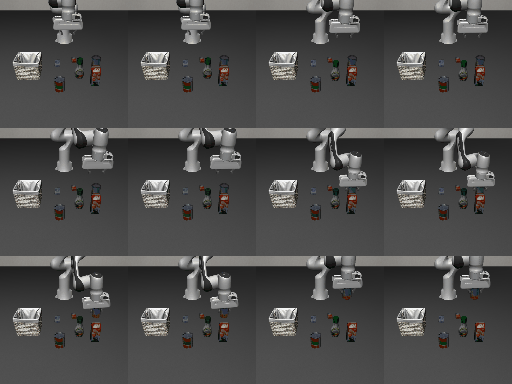
Background-texture perturbation (libero_object … _table_5) — MetaSim
reproduces the swapped scene texture; per-frame native-vs-MetaSim pixel
MAE = 0.24 / 255 (sub-pixel — renderer config only; state is exact).
full-quality mp4
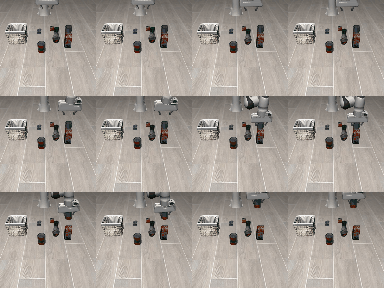
Camera-viewpoint perturbation (libero_object … _view_…) — MetaSim
reproduces the shifted camera; per-frame MAE = 0.16 / 255.
full-quality mp4
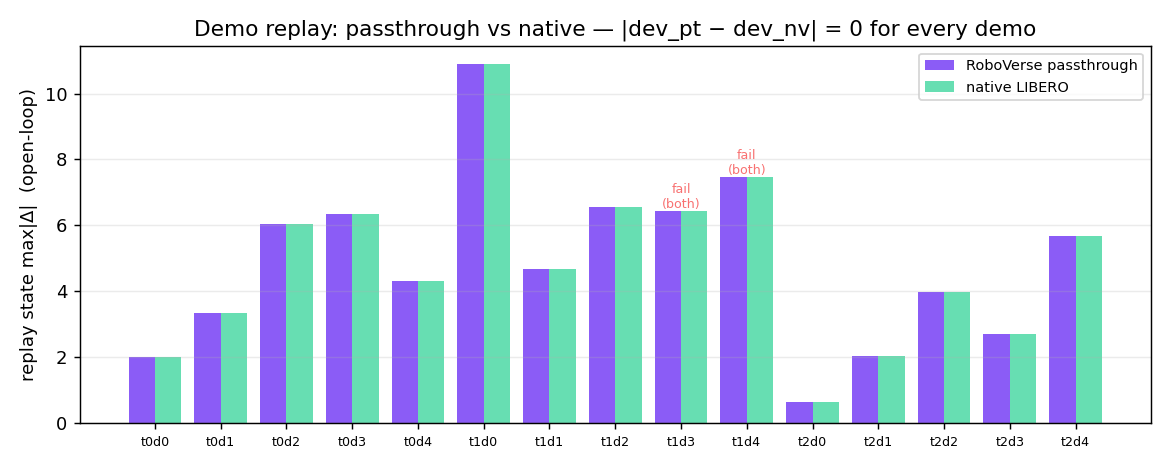
Per-frame max|qpos − recorded| = 0.0 (state exact); the MetaSim engine step
matches reference MuJoCo to max|Δ| = 1.6e-4 (migrate_liberoplus_metasim).
Demo-replay parity (all 5 suites)#
suite |
tasks |
demos |
pt-vs-native max|Δ| |
success (pt / native) |
|---|---|---|---|---|
libero_spatial |
10 |
50 |
0 |
41/50 · 41/50 |
libero_object |
10 |
50 |
0 |
43/50 · 43/50 |
libero_goal |
10 |
50 |
0 |
40/50 · 40/50 |
libero_10 |
10 |
50 |
0 |
37/50 · 37/50 |
libero_90 |
90 |
180 |
0 |
154/180 · 154/180 |
The load-bearing number is passthrough-vs-native = 0 (bitwise across all 380 demos). The ~65 non-successful replays diverge identically on both backends (LIBERO’s intrinsic open-loop OSC_POSE replay non-determinism, not a RoboVerse gap).
OSC_POSE controller parity#
scripts/osc/parity_osc_vs_robosuite.py reports:
(A) per-step torque parity at every real state incl. contact (130 states):
      joint-torque max|Δ| = 5.55e-15 N·m     <- bitwise control-law faithfulness
(B) pre-contact open-loop rollout on MJB-exact model (40 steps):
      arm-qpos max|Δ|     = 1.25e-05 rad
The ported MujocoOSCPose reuses robosuite’s control_utils / transform_utils
math verbatim, reimplementing only the sim-data access (mj_fullM, mj_jacSite,
EE pose/vel, qfrc_bias) on MetaSim’s dm_control Physics. It emits joint
torques into the existing dof_torque path → additive, opt-in, zero blast radius.
Real policy robustness (closed-loop, via the passthrough)#
An ACT-style BC policy trained on clean libero_object demos, evaluated
closed-loop on LIBERO-plus perturbations — exactly the robustness signal the
benchmark measures:
variant |
clean |
light |
sensor-noise |
camera |
|---|---|---|---|---|
success |
8/8 = 1.00 |
0/8 |
6/8 |
4/8 |
passthrough == native under the policy: full-rollout state max|Δ| = 0.
Details and gotchas#
Config bootstrap. LIBERO-plus reads bddl/asset/init roots from
$LIBERO_CONFIG_PATH/config.yaml(default~/.libero). Because base LIBERO and LIBERO-plus share the package name, the passthrough self-writes a dedicated~/.libero_plusconfig from the installed LIBERO-plus package so the 10k perturbation tasks resolve, without touching the base config.Perturbation encoding. File-based dims (background texture
_table_N, lighting_light_N, layout_add_N) are real BDDL files; parametric dims (camera_view_…, robot init_initstate_…, language_language_N, noise_noise_N) are synthetic descriptors that the env wrapper parses to apply the perturbation — so the passthrough must notos.path.isfilethem; it uses the benchmark’s authoritativeget_task_bddl_file_path.Global EGL render context. robosuite/MuJoCo share a process-global EGL context — two
OffScreenRenderEnvalive at once clobber each other’s GL textures, so a texture-only perturbation reads as “0 effect”. Render one env at a time (build → render → close). This is required for any side-by-side or batched rendering, and is why the asset audit / parity harnesses are sequential.Sensor-noise is upstream-stochastic. Noise (motion/gaussian/fog/glass blur) is added to
agentview_imageafter render with an unseedednp.random— the physics/state/reward/done are unaffected (bitwise); only the corrupted image differs across interleaved runs. It reproduces when each env runs in isolation.Lossless model transfer.
env.sim.model.get_xml()→ reload is lossy on mesh inertias; the binarymujoco.mj_saveModel/from_binary_path(MJB) path is lossless (inertials Δ=0) — use MJB when an exact MetaSim model is required.OSC sticky orientation goal. robosuite only updates
goal_oriwhen the orientation delta is non-zero (a sticky goal); the port must match this or it drifts under near-zero wrist deltas. With the fix the control law is bitwise.GPU split (sm_120). The LIBERO sim env pins py3.8 / torch 2.4.1, which can’t use an sm_120 GPU (RTX 5090). Train policies in an sm_120-capable env (torch ≥2.7 / cu128) and run closed-loop eval with CPU inference in the sim env, or via a small sim↔policy socket bridge (
scripts/policy/bridge_*).
Scope notes (honest)#
The passthrough is MuJoCo-only by design: LIBERO is a robosuite/MuJoCo benchmark; porting its MJCF to SAPIEN/Newton needs asset re-authoring + a different contact model = an approximate cross-sim port, not 1:1.
The BC policy is a compact single-task demonstration (pipeline + robustness + passthrough==native), not a SOTA reproduction. The official
Sylvest/openvla-7b-oft-finetuned-libero-pluscheckpoint runs through the same bridge for absolute benchmark numbers.The native pack’s success checking and physics are bitwise (checker 0 mismatch, model fields
max|Δ| = 0). Its render is recompiled from the vendored MJCF, so meshes are re-triangulated and shading differs by ~2–5 / 255 vs robosuite (visually identical); the export path’s compiledmodel.mjbreproduces the agentview pixel-exactly when that is needed.The native pack covers the 130 base tasks. The 10,120 LIBERO-plus perturbations remain passthrough-only (their value is the upstream perturbation pipeline; vendoring all of them is future work).